 Sebario
JsonPDF
💡 The Problem
PDF generation seems straightforward until you actually try to solve it. Most solutions fall into two camps: low-level libraries that give you full control but require you to manually position every element, or HTML-to-PDF converters that fight against CSS’s fundamentally screen-oriented layout model.
JsonPDF takes a different approach: define PDF templates as JSON documents, bind them to data using expressions, and render pixel-perfect PDFs. No HTML. No CSS hacks. No headless browsers.
You can try the live demo here.
Hint: click the “Preview” tab in the bottom-left and press the “Render” button.
⚡ What It Does
Templates follow a three-level hierarchy inspired by banded report designers like JasperReports:
- Sections define page configuration (size, orientation, margins, columns)
- Bands control content flow (headers, footers, detail rows, summaries)
- Elements are visual primitives positioned absolutely within bands
This gives you the predictability of absolute positioning within the flexibility of a flowing layout. Bands stack vertically and break across pages automatically, while elements within each band sit exactly where you put them.
Data binding uses LiquidJS expressions like {{ invoice.total | money: 2 }}, along with conditionals, loops, and filters. Data-driven bands iterate over arrays automatically, and conditional bands show or hide based on expressions.
The ten element types cover most real-world PDF needs: text with styled runs, images with fit modes, tables, barcodes and QR codes, Vega-Lite charts, and frames for complex nested layouts.
📦 Six Packages, One Pipeline
JsonPDF is a TypeScript monorepo with six packages, each with a focused responsibility:
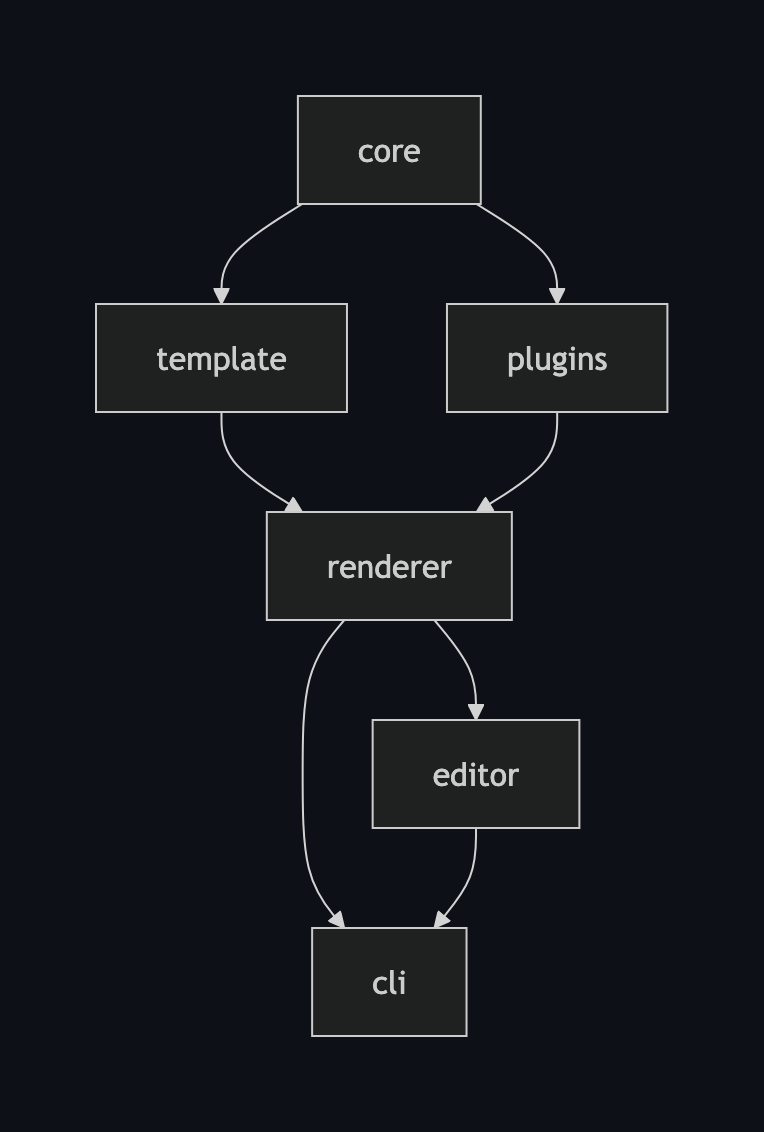
@jsonpdf/core provides the type system, JSON Schema validation, and shared utilities. Everything is measured in points (1/72 inch), the native PDF coordinate unit.
@jsonpdf/template offers immutable CRUD operations for building and modifying templates programmatically. Every operation returns a new object — templates are never mutated.
@jsonpdf/plugins implements the ten element types. Each plugin exposes a measure() and render() interface, receives fully resolved values, and never touches the expression engine directly.
@jsonpdf/renderer ties it all together: validate the template, resolve expressions against data, measure elements, compute layout with page breaks, and render to PDF via pdf-lib. Two-pass rendering makes _totalPages available in expressions like “Page 3 of 12.”
@jsonpdf/cli provides scaffolding, validation, rendering, and editor launching from the command line.
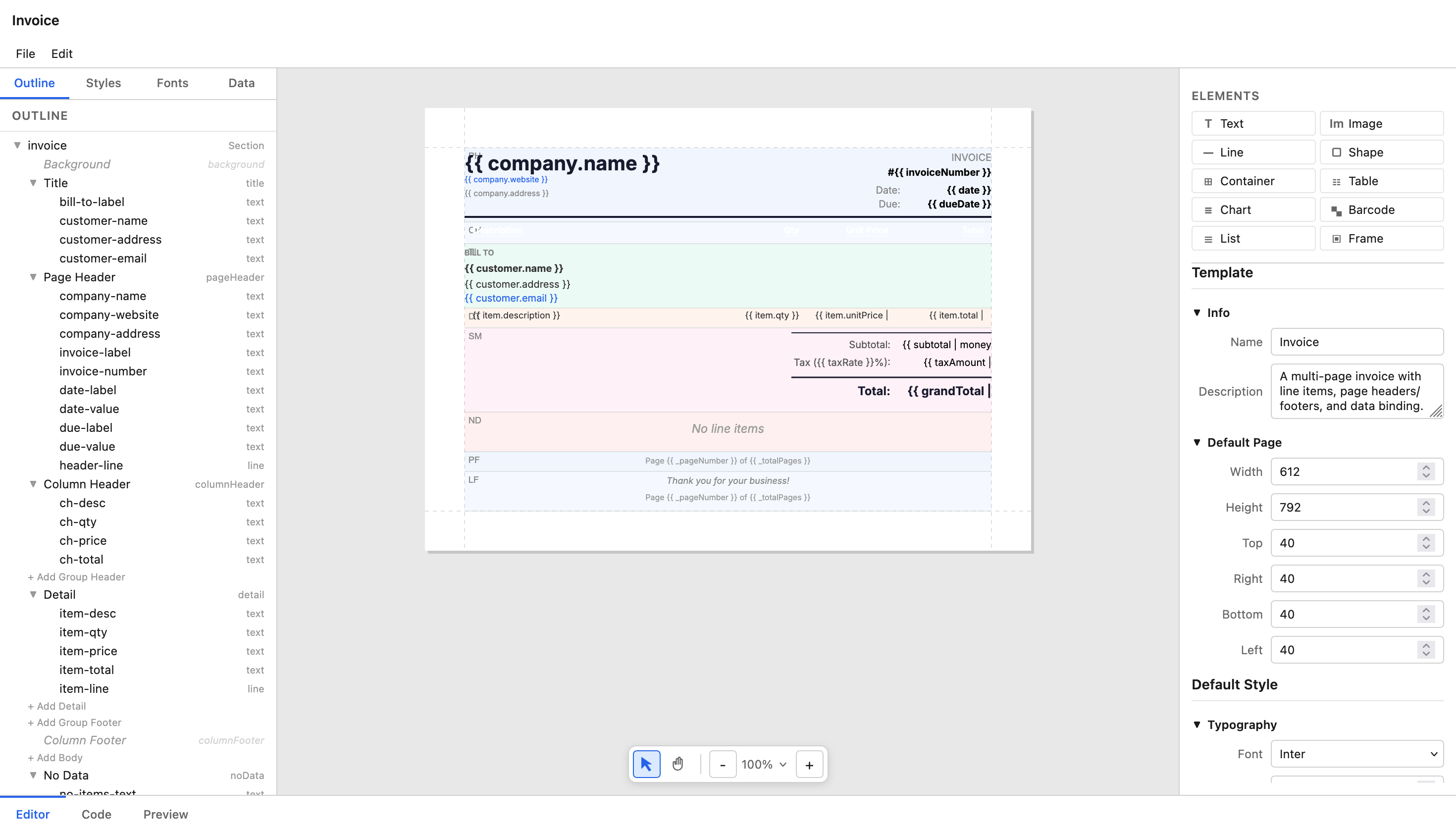
@jsonpdf/editor is a full drag-and-drop template designer built with React, Konva, and Zustand — property panel, style manager, font manager, live PDF preview, and a Monaco-powered code view.
🔀 Immutability as an Architecture Decision
Making template operations return new objects felt expensive at first, but it paid off immediately. The editor’s undo/redo is just Zustand’s temporal middleware tracking state snapshots. No custom undo logic needed.
This pattern extends throughout the rendering pipeline. Plugins never see raw Liquid expressions — the resolver pass converts everything to concrete values before measurement and rendering. Plugins are pure functions of their inputs, which makes them easy to test and reason about.
🖼️ The Frame Element
This was the hardest plugin to build. A frame is essentially a nested band container with its own independent layout, where bands flow and break within the frame’s bounds.
It enables layouts like a pay stub where earnings and deductions sit side by side, each with their own headers and detail rows. Think of it as a document within a document — same layout engine, scoped to a rectangle on the page.
🔤 Embedded Fonts for Portability
Storing fonts as base64 inside the template JSON makes templates fully portable. You can email a template file and it will render identically anywhere. No external file dependencies, no font installation, no “works on my machine.”
The CLI scaffolding includes Inter by default, and any @fontsource font can be added through the editor.
🌐 One Engine, Two Runtimes
One design goal was that the same rendering engine should work in both Node.js and the browser. Three platform-specific modules (filesystem access, SVG rasterization, and initialization) each have a Node and browser variant, resolved at build time using Node’s imports field for conditional subpath imports.
In the browser, consumers call initBrowser(resvgWasm) once to load the WebAssembly SVG rasterizer, and everything else just works.
🧩 Why This Stack
The project leans on solid, focused libraries:
- pdf-lib for PDF generation (pure JS, works everywhere)
- LiquidJS for expression binding
- AJV for JSON Schema validation
- bwip-js for barcodes and QR codes
- Vega-Lite for charts
- @resvg for SVG rasterization (native on Node, WASM in browser)
- React 19 + Konva + Zustand for the visual editor
- Vitest for testing
🎯 Takeaways
A few patterns worth stealing:
-
Immutable operations unlock editor features for free. If your data structures are immutable, undo/redo is just state snapshots. No command pattern, no inverse operations, no bugs.
-
Resolve expressions before rendering. Keeping the expression engine out of plugins means each plugin is a pure function. Testing a text element doesn’t require mocking a template engine.
-
Embed dependencies when portability matters. Base64 fonts inside JSON means a template is one file with zero external dependencies. Self-contained artifacts are easier to share, store, and reproduce.
-
Conditional subpath imports solve cross-platform libraries. Node’s
importsfield lets you swap implementations per environment without bundler plugins or runtime checks.
🚀 What’s Next
JsonPDF is currently in alpha. The core rendering pipeline is stable and the editor is functional, but there’s more to build: better documentation, more element types, performance optimizations for large documents, and a plugin API for custom elements.
If you’re interested in a JSON-first approach to PDF generation, check out the project on GitHub. The 15 example templates (invoices, certificates, dashboards, shipping labels, resumes, and more) are a good place to start exploring what’s possible.
# JsonPDF
<img src="/images/projects/jsonpdf/editor.png" alt="jsonpdf editor" class="" />
## 💡 The Problem
PDF generation seems straightforward until you actually try to solve it. Most solutions fall into two camps: low-level libraries that give you full control but require you to manually position every element, or HTML-to-PDF converters that fight against CSS's fundamentally screen-oriented layout model.
**JsonPDF** takes a different approach: define PDF templates as JSON documents, bind them to data using expressions, and render pixel-perfect PDFs. No HTML. No CSS hacks. No headless browsers.
You can try the [live demo here](https://jsonpdf.com).
**Hint:** click the "Preview" tab in the bottom-left and press the "Render" button.
## ⚡ What It Does
Templates follow a three-level hierarchy inspired by banded report designers like JasperReports:
- **Sections** define page configuration (size, orientation, margins, columns)- **Bands** control content flow (headers, footers, detail rows, summaries)- **Elements** are visual primitives positioned absolutely within bands
This gives you the predictability of absolute positioning within the flexibility of a flowing layout. Bands stack vertically and break across pages automatically, while elements within each band sit exactly where you put them.
Data binding uses LiquidJS expressions like `{{ invoice.total | money: 2 }}`, along with conditionals, loops, and filters. Data-driven bands iterate over arrays automatically, and conditional bands show or hide based on expressions.
The ten element types cover most real-world PDF needs: text with styled runs, images with fit modes, tables, barcodes and QR codes, Vega-Lite charts, and frames for complex nested layouts.
## 📦 Six Packages, One Pipeline
JsonPDF is a TypeScript monorepo with six packages, each with a focused responsibility:
<img src="/images/projects/jsonpdf/dependency-graph.png" width="300px" alt="jsonpdf editor" class="" />
**@jsonpdf/core** provides the type system, JSON Schema validation, and shared utilities. Everything is measured in points (1/72 inch), the native PDF coordinate unit.
**@jsonpdf/template** offers immutable CRUD operations for building and modifying templates programmatically. Every operation returns a new object — templates are never mutated.
**@jsonpdf/plugins** implements the ten element types. Each plugin exposes a `measure()` and `render()` interface, receives fully resolved values, and never touches the expression engine directly.
**@jsonpdf/renderer** ties it all together: validate the template, resolve expressions against data, measure elements, compute layout with page breaks, and render to PDF via pdf-lib. Two-pass rendering makes `_totalPages` available in expressions like "Page 3 of 12."
**@jsonpdf/cli** provides scaffolding, validation, rendering, and editor launching from the command line.
**@jsonpdf/editor** is a full drag-and-drop template designer built with React, Konva, and Zustand — property panel, style manager, font manager, live PDF preview, and a Monaco-powered code view.
## 🔀 Immutability as an Architecture Decision
Making template operations return new objects felt expensive at first, but it paid off immediately. The editor's undo/redo is just Zustand's temporal middleware tracking state snapshots. No custom undo logic needed.
This pattern extends throughout the rendering pipeline. Plugins never see raw Liquid expressions — the resolver pass converts everything to concrete values before measurement and rendering. Plugins are pure functions of their inputs, which makes them easy to test and reason about.
## 🖼️ The Frame Element
This was the hardest plugin to build. A frame is essentially a nested band container with its own independent layout, where bands flow and break within the frame's bounds.
It enables layouts like a pay stub where earnings and deductions sit side by side, each with their own headers and detail rows. Think of it as a document within a document — same layout engine, scoped to a rectangle on the page.
## 🔤 Embedded Fonts for Portability
Storing fonts as base64 inside the template JSON makes templates fully portable. You can email a template file and it will render identically anywhere. No external file dependencies, no font installation, no "works on my machine."
The CLI scaffolding includes Inter by default, and any @fontsource font can be added through the editor.
## 🌐 One Engine, Two Runtimes
One design goal was that the same rendering engine should work in both Node.js and the browser. Three platform-specific modules (filesystem access, SVG rasterization, and initialization) each have a Node and browser variant, resolved at build time using Node's `imports` field for conditional subpath imports.
In the browser, consumers call `initBrowser(resvgWasm)` once to load the WebAssembly SVG rasterizer, and everything else just works.
## 🧩 Why This Stack
The project leans on solid, focused libraries:
- **pdf-lib** for PDF generation (pure JS, works everywhere)- **LiquidJS** for expression binding- **AJV** for JSON Schema validation- **bwip-js** for barcodes and QR codes- **Vega-Lite** for charts- **@resvg** for SVG rasterization (native on Node, WASM in browser)- **React 19 + Konva + Zustand** for the visual editor- **Vitest** for testing
## 🎯 Takeaways
A few patterns worth stealing:
1. **Immutable operations unlock editor features for free.** If your data structures are immutable, undo/redo is just state snapshots. No command pattern, no inverse operations, no bugs.
2. **Resolve expressions before rendering.** Keeping the expression engine out of plugins means each plugin is a pure function. Testing a text element doesn't require mocking a template engine.
3. **Embed dependencies when portability matters.** Base64 fonts inside JSON means a template is one file with zero external dependencies. Self-contained artifacts are easier to share, store, and reproduce.
4. **Conditional subpath imports solve cross-platform libraries.** Node's `imports` field lets you swap implementations per environment without bundler plugins or runtime checks.
## 🚀 What's Next
JsonPDF is currently in alpha. The core rendering pipeline is stable and the editor is functional, but there's more to build: better documentation, more element types, performance optimizations for large documents, and a plugin API for custom elements.
If you're interested in a JSON-first approach to PDF generation, check out the project on [GitHub](https://github.com/jsonpdf/jsonpdf). The 15 example templates (invoices, certificates, dashboards, shipping labels, resumes, and more) are a good place to start exploring what's possible.